Membership is FREE!
It is best to log in before posting. Anonymous posting is disabled.

Midi port check

Model technics SX-PX2091-EN SERIAL NO Z95A5450 Midi ports, are they sending/recieving? Is there an easy way to detect a midi signal when pressing on the piano keyboard. Assuming I have no cables available. I am about to buy this piano but cann…

Viewing 1 to 2 (2 Total)
Midi port check

kohler49

kohler49
Sweden

Total Posts: 1
Joined: April 22, 2019

Model technics SX-PX2091-EN
SERIAL NO Z95A5450

Midi ports, are they sending/recieving?

Is there an easy way to detect a midi signal when pressing on the piano keyboard.
Assuming I have no cables available.

I am about to buy this piano but cannot apply computer, soundcard, Cakewalk .... all that is needed for a check.

I am aware the input testing is a bit tricky but just knowing the output sends something is a good step forward.

regards

Tags: Midi port check
Posted on April 22, 2019 at 5:49 PM
Display Messages: Threaded     Flat
1 Reply

admin

admin
United Kingdom

Total Posts: 1055
Joined: February 2, 2014

Re: Midi port check

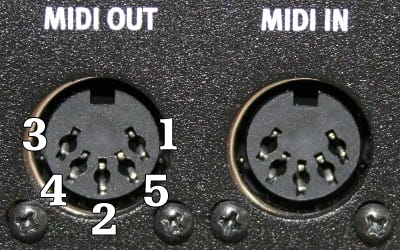
You should be able to read a small value with a multimeter across pins 4 and 5 when keys are depressed.


Please note that I'm not an engineer and this is not advice you should rely on (ie I haven't done it myself). And you need to check that the pins are correct by reference to the service manual or circuit board.

However, I've never encountered any brand of keyboard where the midi ports didn't work, they are usually very reliable.

Do ensure that you have set up the instrument so that midi signals are being sent according to the instructions.

Best wishes,
Mike

Attachments: midi-port-tester.png
Posted on April 23, 2019 at 9:32 PM