- Forums
- »
- The Technics Keyboard Icons Program
- »
- Installation failed
|
Viewing 1 to 17 (17 Total) Installation failed |
|
|---|---|
NAM
Netherlands Total Posts: 19
Joined: August 17, 2014
|
Hi Mike,
Tags:
Posted on January 10, 2016 at 5:55 PM
|
|
|
|
admin
United Kingdom Total Posts: 1055
Joined: February 2, 2014
|
Re: Installation failedHi Bert,
Posted on January 10, 2016 at 6:47 PM
|
NAM
Netherlands Total Posts: 19
Joined: August 17, 2014
|
Re: Installation failed1.I tried to install after restarting the computer but again it failed with same message.
Posted on January 11, 2016 at 11:05 AM
|
Dmitriy
Total Posts: 3
Joined: January 12, 2016
|
Re: Installation failed:2 NAM
Posted on January 12, 2016 at 2:23 PM
|
NAM
Netherlands Total Posts: 19
Joined: August 17, 2014
|
Re: Installation failedDmitriy, thanks for your help but I am afraid that it is not clear for me. I have 2 quaestions:
Posted on January 12, 2016 at 6:13 PM
|
admin
United Kingdom Total Posts: 1055
Joined: February 2, 2014
|
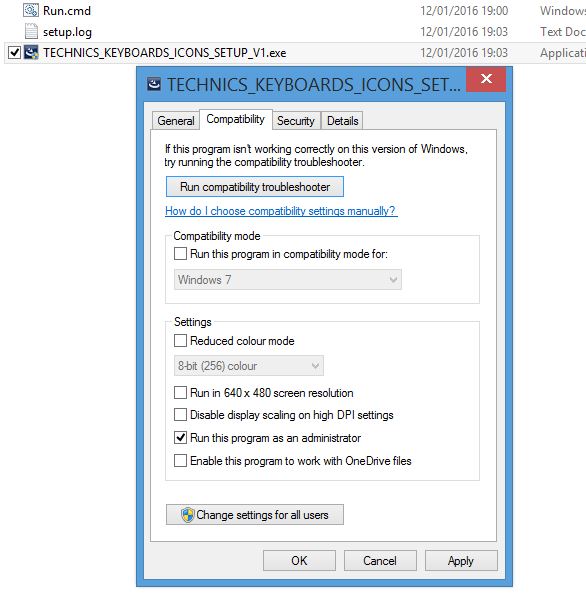
Re: Installation failedHi NAM and Dmitriy,
Attachments:
Run.cmd
RUN_AS_ADMINISTRATOR.JPG
Posted on January 12, 2016 at 7:20 PM
|
NAM
Netherlands Total Posts: 19
Joined: August 17, 2014
|
Re: Installation failedI got the 2 files both in one folder. I have ticked "'Run as administrator'' in the com[patibility tab. (I noticed that Vista is not mentioned in the compatibility modus (strange?) so I choosed the latest version XP servicepack 2. Then I dubbleclicked the Run file. For a split second I then see a black popup and nothing happens.
Posted on January 12, 2016 at 9:12 PM
|
admin
United Kingdom Total Posts: 1055
Joined: February 2, 2014
|
Re: Installation failedThank you Bert.
Posted on January 12, 2016 at 9:17 PM
|
admin
United Kingdom Total Posts: 1055
Joined: February 2, 2014
|
Re: Installation failedPS - you might have to right-click on my run.cmd and choose "save as" to save it.
Posted on January 12, 2016 at 9:18 PM
|
admin
United Kingdom Total Posts: 1055
Joined: February 2, 2014
|
Re: Installation failedPPS out of interest, Vista is not listed in your compatibility list because you are running Vista. Similarly, I am running Windows 8 so that isn't listed in mine but Vista is. So, leaving it unticked means that you are in Vista mode.
Posted on January 12, 2016 at 10:21 PM
|
NAM
Netherlands Total Posts: 19
Joined: August 17, 2014
|
Re: Installation failedMike,
Posted on January 13, 2016 at 9:25 AM
|
Dmitriy
Total Posts: 3
Joined: January 12, 2016
|
Re: Installation failed2 NAM
Posted on January 13, 2016 at 9:46 AM
|
admin
United Kingdom Total Posts: 1055
Joined: February 2, 2014
|
Re: Installation failedHi NAM,
Attachments:
Run.zip
Posted on January 14, 2016 at 7:09 AM
|
NAM
Netherlands Total Posts: 19
Joined: August 17, 2014
|
Re: Installation failedThanks Mike,
Attachments:
setup.log
Posted on January 14, 2016 at 8:25 AM
|
Dmitriy
Total Posts: 3
Joined: January 12, 2016
|
Re: Installation failedHi, NAM.
Attachments:
Run2.zip
Posted on January 14, 2016 at 10:29 AM
|
NAM
Netherlands Total Posts: 19
Joined: August 17, 2014
|
Re: Installation failedHi Dmitriy,
Attachments:
test.log
Posted on January 14, 2016 at 3:10 PM
|
NAM
Netherlands Total Posts: 19
Joined: August 17, 2014
|
Re: Installation failedNo solution yet?
Posted on February 7, 2016 at 12:05 PM
|